


Add the supplier indicators to the supplier movements (after appending them)
Add supplier indicators
In the above diagram, we have added the supplier account group and the indicator that the supplier is a one-time supplier.
Note: it is the settings of the supplier account group that determine whether the supplier will behave like a one-time supplier in the system (and whether the bank details can be entered at posting FB60/MIRO).
Filter supplier invoices on one-time suppliers and on the value
The LFA1_XCPDK field is derived from the supplier account group settings by the system. It is easier to filter on this field because it is not a text field. Text fields can have different names depending on the entity. Whereas flags, are just yes or no (X or ”).
Code example: Identify one-time suppliers
ZV_DF_BSAIK_PAY_1TS=(
   ZV_DF_BSAIK_PAY
   .filter(
      (
          PI_POLARS.col('LFA1_XCPDK') != ''
      ) &
      (
          PI_POLARS.col('ZF_BSAIK_DMBTR_SIGNED_USD')>
          ZV_NU_1TS_THRESHOLD
      )
   )
)
In the above code, we check if the supplier is a one time supplier based on the flag and also if the value is over a pre-defined threshold. Note, that we use the signed value and that we use the USD value (if our threshold is in USD), in case we have multiple companies codes (with different house currencies).
Check frequency of bank account for one-time supplier
One-time suppliers are supposed to only be used once. Therefore, we don’t expect the same bank account to be found for them multiple times in the payment settlement data.
Code example: Check number of payments per bank account per month
ZV_DF_REGUH(
   ZV_DF_REGUH
   .filter(
       (
          PI_POLARS.col('REGUH_VBLNR')
          .is_in(
             ZV_DF_BSAIK_PAY_1TS['BSAIK_BELNR']
       ) &
       (
           PI_POLARS.col('REGUH_LAUFD')
           .str.slice(0,4)
           .is_in(
             ZV_DF_BSAIK_PAY_1TS['BSAIK_GJAHR']
           )
       )
   )
   .group_by(
      [
         (
           PI_POLARS.col('REGUH_LAUFD')
           .str.slice(0,4)
         ),
         PI_POLARS.col('REGUH_ZBNKN')
      ]
   )
   .agg(
      [
         PI_POLARS.col('REGUH_VBLNR')
         .n_unique()
         .alias('ZF_REGUH_ZBNKN_COUNT'),

         PI_POLARS.col('ZF_REGUH_RBETR_SIGNED')
         .sum()
         .alias('ZF_REGUH_RBETR_SIGNED')
      ]
   )
)
In the above code, we do the follwoing steps:
- Filter on the list of payments in the settlement program that are for one time suppliers, based on the payment document number that was identified in the first code example in this lesson
- Count the total number and value of payments per beneficiary account and month
Note: the above code can show us the frequency of postings per beneficiary account, only for payments to one-time suppliers that are made using the F110 transaction code (which uses the payments program). If the payments are entered manually, using a manual journal entry, then the beneficiary account is not shown in SAP.
Basd on the above code we could then make a historgram to show us the frequency of usage of bank account for suppliers that are one-time suppliers.
Frequency of payments to one-time supplier beneficiary accounts
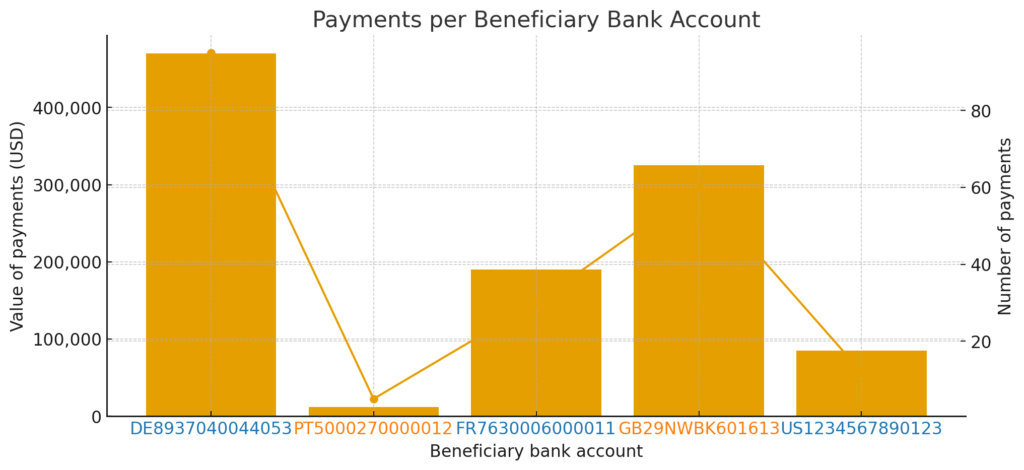
The above is a chart generated by chatGPT. It shows us that for account DE8937040044053, there were over 80 payments for over 400K USD. If we see data like this for suppliers that are in the one-time supplier account group, then we could consider that the supplier that owns the bank account in question, has been incorrectly classified as a one-time supplier. We would consider the risk that the one-time supplier account group is not being used correctly: risk of misappropriation through circumvention of internal controls (due diligence, bank account modification call-back) via the one-time supplier account.
Create the list of payments used above
We will add the general ledger information to the supplier movements in order to be able to categorize the transactions as payments.
Add general ledger information
Most important account per journal entry number
After adding the flags from the general ledger, we will next obtain a list of the most important accounts on debit and the most important accounts on credit.
We will then link these lists together on the journal entry number.
Note: we keep the header information that we need to use for our test, when creating the debit list.
We will call the resulting table our accounting schemes.
Code example: most important account on debit
    ZV_DF_BSEG_BKPF_D = (
        ZV_DF_BSEG_BKPF
        .filter(
           PI_POLARS.col('BSEG_SHKZG') == 'S'
        )
        .group_by([
            'BSEG_BUKRS',
            'BSEG_GJAHR',
            'BSEG_BELNR'
        ])
        .agg(
            [
                PI_POLARS.col('BSEG_HKONT')
                .sort_by(BSEG_DMBTR, descending=True)
                .first()
                .alias('ZF_BSEG_HKONT_D'),

                PI_POLARS.col('SKAT_TXT20')
                .sort_by(BSEG_DMBTR, descending=True)
                .first()
                .alias('ZF_SKAT_TXT20_D'),

                PI_POLARS.col('SKB1_HBKID')
                .sort_by(BSEG_DMBTR, descending=True)
                .first()
                .alias('ZF_SKB1_HBKID_D'),

                PI_POLARS.col('SKA1_XBILK')
                .sort_by(BSEG_DMBTR, descending=True)
                .first()
                .alias('ZF_SKA1_XBILK_D'),

                PI_POLARS.col('SKA1_GVTYP')
                .sort_by(BSEG_DMBTR, descending=True)
                .first()
                .alias('ZF_SKA1_GVTYP_D'),

                PI_POLARS.col('BSEG_KOART')
                .sort_by(BSEG_DMBTR, descending=True)
                .first()
                .alias('ZF_BSEG_KOART_D'),

                PI_POLARS.col('SKB1_XGKON')
                .sort_by(BSEG_DMBTR, descending=True)
                .first()
                .alias('ZF_SKB1_XGKON_D'),

                PI_POLARS.col('BKPF_USNAM')
                .first()
                .alias('BKPF_USNAM'),

                PI_POLARS.col('BKPF_AWTYP')
                .first()
                .alias('BKPF_AWTYP'),

                PI_POLARS.col('BKPF_TCODE')
                .first()
                .alias('BKPF_TCODE'),

                PI_POLARS.col('BKPF_BKTXT')
                .first()
                .alias('BKPF_BKTXT')

                PI_POLARS.col('BSEG_XAUTO')
                .sort_by(BSEG_DMBTR, descending=True)
                .first()
                .alias('ZF_BSEG_XAUTO_D'),

             ]
        )
Code example: most important account on credit
    ZV_DF_BSEG_BKPF_C = (
        ZV_DF_BSEG_BKPF
        .filter(
           PI_POLARS.col('BSEG_SHKZG') == 'H'
        )
        .group_by([
            'BSEG_BUKRS',
            'BSEG_GJAHR',
            'BSEG_BELNR'
        ])
        .agg(
            [
                PI_POLARS.col('BSEG_HKONT')
                .sort_by(BSEG_DMBTR, descending=True)
                .first()
                .alias('ZF_BSEG_HKONT_C'),

                PI_POLARS.col('SKAT_TXT20')
                .sort_by(BSEG_DMBTR, descending=True)
                .first()
                .alias('ZF_SKAT_TXT20_C'),

                PI_POLARS.col('SKA1_XBILK')
                .sort_by(BSEG_DMBTR, descending=True)
                .first()
                .alias('ZF_SKA1_XBILK_C'),

                PI_POLARS.col('SKA1_GVTYP')
                .sort_by(BSEG_DMBTR, descending=True)
                .first()
                .alias('ZF_SKA1_GVTYP_C'),

                PI_POLARS.col('BSEG_KOART')
                .sort_by(BSEG_DMBTR, descending=True)
                .first()
                .alias('ZF_BSEG_KOART_C'),

                PI_POLARS.col('SKB1_XGKON')
                .sort_by(BSEG_DMBTR, descending=True)
                .first()
                .alias('ZF_SKB1_XGKON_C'),

                PI_POLARS.col('SKB1_HBKID')
                .sort_by(BSEG_DMBTR, descending=True)
                .first()
                .alias('ZF_SKB1_HBKID_C'),


                PI_POLARS.col('BSEG_XAUTO')
                .sort_by(BSEG_DMBTR, descending=True)
                .first()
                .alias('ZF_BSEG_XAUTO_C'),
             ]
        )
Code example: link debit and credit together
    ZV_DF_BSEG_BKPF_ACC_SCHEMES = (
        ZV_DF_BSEG_BKPF_D
        .join(
             ZV_DF_BSEG_BKPF_C,
             on = [
                'BSEG_BUKRS',
                'BSEG_GJAHR',
                'BSEG_BELNR'
             ],
             how='inner'
         )
     )
Code example: Select supplier payment
ZV_DF_BSEG_BKPF_ACC_SCHEMES = (
        ZV_DF_BSEG_BKPF_ACC_SCHEMES
        .with_columns([
            PI_POLARS.when(
                (PI_POLARS.col('ZF_BSEG_KOART_D') == 'K') &
                (PI_POLARS.col('ZF_BSEG_KOART_C') == 'S: Bank')
            ).then(PI_POLARS.lit('Supplier payment'))
Here we use the field ZF_BSEG_KOART_C (meaning account type on credit) and we say it is equal to S: Bank. In the SAP system, we can only know that it is S. The word Bank is something that we have added. We know if an account is of type S: Bank thanks to the following:
- It has a house bank indicator (SKB1_HBKID)
- It is flagged as a disbursement account (SKB1_XGKON)
- It is found in the mapping between house banks and general ledger accounts (T012K_HKONT)
- It is found in the payment program settlements data (REGUH_HKONT)
- It is found in the electronic bank statements table (FEBKO_HKONT)
If any of the above criteria are true then we can assume that the general ledger account relates to bank, and so we label it S:Bank. However, if sometimes our account does not have any of the above criteria, but behaves like an account for bank. For example, sometimes we have a suspense account that is used for customer incoming payments.
If it is not clear at the time of the reception of the payment, who the payment is from, then the payment may be booked to a suspense account. on credit (debit bank, credit suspense account). Then when the correct customer is identified we can net-off the suspense transaction (debit suspense account, credit customer).
This type of “two-step” transaction process can make it a little bit more difficult to categorize our journal entries. might have to do a pre-analysis in ordre to identify these suspense accounts.
Append the supplier open and closed movements
To get the full list of supplier movements, we need to append the open and close items together. This is easily done in python.
Code example: append open and closed supplier movements
    ZV_DF_BSAK_BSIK = (
      PI_POLARS.concat(
        [
            A_BSAK,
            A_BSIK
	],
        how='diagonal'
    )
You may notice that we use the parameter how=’diagonal’. This tells python to append the data, by matching up the field names. If there are fields in one table and not in the other table, then nulls will be put for the rows from the table with the missing fields.
To avoid nulls, we need to make sure that our BSAK table and our BSIK table have the same list of fields.
Responses